Keep Your Content Management System Options Open: WordPress Isn't the Only Game in Town
BLOG
BLOG

Over the years, I’ve been fortunate to use several different content management systems (CMS) on website builds for a variety of businesses. Each project helped me form new opinions about the software, or reinforce existing ones. Below are some of my thoughts and observations to help you choose a CMS option for your upcoming web project.
Early in my career, I was building strictly static sites, but looking for a product that could be easily integrated into my own HTML. Expression Engine was the perfect fit because it makes no assumptions about how the data and presentation should be structured—no template rules or themes were limiting the page’s layout. This lowered the learning curve, because all I had to focus on was Expression Engine’s syntax. Many years later, I still find this workflow easier than a pre-defined template system.
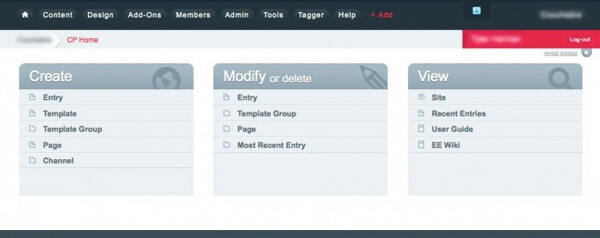
Expression Engine’s benefits extend beyond design flexibility. According to EllisLab (Expression Engine’s developers), it hasn’t had a major security breach in about 10 years. Almost any developer can tell you this is a big difference from WordPress.
There are drawbacks, however. The text editor has minimal options, the update process is cumbersome at best, the number of custom field types is limited—and I feel the price is a little steep for what you get.
The bottom line is that Expression Engine isn’t flashy and it doesn’t have a lot of bells and whistles, but it’s a solid performer that offers security and flexibility.
Price: $300, discounts for nonprofits
www.ellislab.com/expressionengine
In the interest of transparency, I’m not a fan of WordPress. However, its popularity makes it impossible to ignore. My bias aside, I’ve worked on a variety of WordPress projects and found some positive qualities:
However, what a lot of people proclaim as one of WordPress’ biggest strengths, I see as one of its biggest weaknesses—plugins.

If you want to simply turn your site “off” and display a maintenance page, you’ll need a plugin. If you want to easily create a relationship between two entries, you’ll need a plugin. Want a number field type? Plugin. Pretty soon, you’re relying on a lot of third-party code rather than just WordPress itself to provide vanilla CMS functionality. The need for plugins is the reason I still consider WordPress a blogging engine and not a true CMS.
Security is another concern. WordPress is infamous for security updates and patches but, to be fair, this is likely due to its popularity more than anything else. It makes more sense to attack a large user base than a smaller one like Expression Engine.
None of these issues have hurt its popularity, as it currently powers roughly 24 percent of all websites. Personally, I’d love to see WordPress create separate versions of their software for bloggers and developers, and turn some of the necessary plugins into native functionality.
Even though I don’t care for WordPress, I understand why people use it. It’s free, it’s easier for non-developers to use, and with a few plugins (or 20), there’s very little it can’t do.
Price: Free
Craft is the new kid on the block and is developed by the same people who build some of the best Expression Engine plugins available.
Like Expression Engine, Craft also has no expectations about how you’re going to structure your site or its data. It uses the Twig template engine to provide tags, filters, functions, and custom template inheritance.
Where Craft really starts to shine, though, is the freedom you have in designing the back-end. With an arsenal of entry types, section types, custom fields, matrix blocks, and reusable fields, using Craft is a refreshing experience. Craft also allows elements such as users and assets (images and documents) to have custom fields assigned to them.
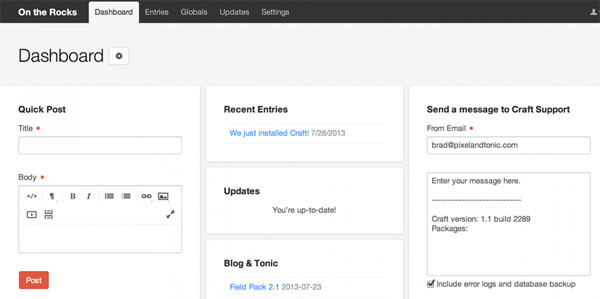
This may not sound exciting, but imagine you have a site that allows visitors to search for images based on color. With Craft, you can easily assign a color field to your images (separate from any post or entry) and select the image’s primary color through the eyedropper. Think about that for a second, and it shouldn’t take long before you can start to imagine the possibilities of Craft’s flexibility and built-in functionality.
Like everything though, there are downsides. Due to Craft’s newness, its community is still small, and finding solutions to development issues may not be as easy as it could be for WordPress or even Expression Engine projects. Another negative is the list of plugins and add-ons is small, and some are rather expensive.
All in all, I think Craft has a very bright future. The development team is responsive and forward thinking, and the functionality is well thought out. As for its plugin shortcomings, this will change as the user base increases.
Price: $200 - $300
What do the critics have to say? At CMS Critic, Craft was nominated as the best CMS for designers and developers, WordPress was nominated as the best for personal websites, and Expression Engine wasn’t nominated in any category.
Ultimately, your choice will likely come down to numerous factors such as previous experience, budget, available talent, and technical requirements. Regardless of what you choose, know that each one is a capable CMS, and in the right hands has very few limitations.
Blog
Use CSR data to your advantage - Don't let consumers' imaginations work against you.
Blog
When you're introducing a new health insurance concept, it pays to keep it simple.
Blog
There’s not an app for that.